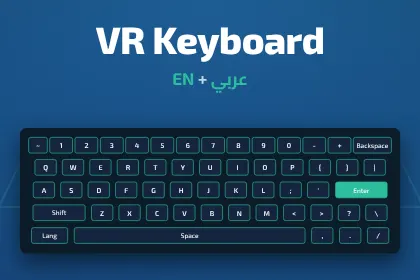
VR on-screen keyboard for any TMP_InputField. English & Arabic with correct letter shaping, auto show/hide, Meta XR & XRI ready.
| Tier | Seats | Covers |
|---|---|---|
| Individual | 1 seat | Personal and indie commercial use. Ship in unlimited commercial projects. |
| Studio | Up to 10 seats | The same rights, shared across a studio of up to ten people. |
| Enterprise | Unlimited seats | Unlimited seats and priority support. |
Perpetual and royalty-free on every tier. Redistribution or resale of the source files is not permitted. Full licence terms
VR Custom Keyboard is a ready-to-use on-screen keyboard for Unity XR projects. Drop the prefab into your scene, select any TextMeshPro input field, and start typing in English or Arabic.
Typing Arabic in Unity is usually painful: letters come out disconnected and reversed. This keyboard ships with a full Arabic PC layout and an input fixer that shapes Arabic text correctly as the user types, so names, search terms, and chat messages look the way they should.
KEY FEATURES
• Works with any TMP_InputField, no custom field type required • Automatic show/hide: appears when an input field is selected, hides when focus moves away. No code needed for basic use • English and Arabic layouts with live language switching from a single "Lang" key • Correct Arabic letter shaping and right-to-left display via ArabicInputFixer • Arabic-Indic numerals on the Arabic layout • Shift/caps toggle with configurable highlight colors • Hold-to-repeat Backspace • Fully themeable: every key is a standard uGUI Image + TextMeshPro label, so you can restyle colors, sprites, and fonts directly in the Inspector • Optional Meta XR SDK support for poke and ray interaction, toggled from the Inspector • Compatible with XR Interaction Toolkit and any other XR rig, no hard XR SDK dependency • Optional physical-keyboard passthrough (Input System) for fast desktop testing in Play Mode • Works in world space for VR or inside a regular screen-space UI Canvas • Clean namespace (GenesisCreations.VRKeyboard) and a small, simple public API
SETUP IN UNDER A MINUTE
1. Drag KeyboardCanvas.prefab into your scene. 2. Select any TMP_InputField, the keyboard appears automatically. 3. For Arabic, add the ArabicInputFixer component to the input field.
You can also target a field from code with keyboard.SetTarget(myField).
PUBLIC API
SetTarget, Type, Backspace, Space, Clear, Submit, ToggleShift, ToggleLanguage, Hide.
WHAT'S INCLUDED
• VRKeyboard: main controller (show/hide, language, shift, target field) • KeyboardKey: per-key output for each language and shift state • HoldRepeat: hold-to-repeat Backspace behaviour • ArabicInputFixer: Arabic shaping for TMP_InputField • VRKeyboardInputDriver: optional physical keyboard passthrough • Prefabs: KeyboardCanvas (fully wired layout), VRKeyboard, KeyboardKey • README with setup, API, and Inspector reference
PERFECT FOR
Login and registration screens, player names, search bars, chat, room codes, training and enterprise VR apps, and any XR project targeting Arabic-speaking users.
Third-party notice: includes Arabic support by Abdullah Konash (MIT License). See Third-Party Notices.txt in the package.
TECHNICAL DETAILS ------------------------ • Unity 6.3.10 LTS or newer • Requires: TextMeshPro, Unity UI (uGUI), both included by default in Unity 2022.3+ • Optional: Unity Input System (physical keyboard driver), Meta XR SDK (poke/ray interaction), XR Interaction Toolkit • Render pipelines: Built-in, URP, and HDRP (uses standard uGUI, no custom shaders) • Platforms: Meta Quest, PC VR (OpenXR), and desktop • Languages: English, Arabic • Scripts: 6 C# files, full source included • Documentation: README.md included
Use in unlimited commercial projects under the selected license tier. Redistribution or resale of source files is not permitted.
90 days on assets and tools; 14 days on courses if under 20% watched. Version updates within the major version are free.
Read the full license →Read the refund policy →Loading reviews…
Loading questions…